GIOS M1: Introduction to Operating Systems
Module 1 of CS 6200 - Graduate Introduction to Operating Systems @ Georgia Tech.
What is an Operating System?
Overview
An operating system (OS) is a piece of software which abstracts and arbitrates the underlying hardware of a computing system.
- Abstraction: hide intricate implementation details and expose only essential information.
- Arbitration: oversee / manage / control hardware use.
The OS is responsible for directing operational resources, enforcing working policies, and mitigating the difficulty of complex tasks.
- Direct Operational Resources: controls use of CPU, memory, peripheral devices, etc.
- Enforce Working Policies: provides fair resource access and/or define limits to resource usage.
- Mitigate Difficulty of Complex Tasks: simplifies view of underlying hardware via abstraction mechanisms (ex: system calls).
Role within Computing System
A computer system refers to a combination of hardware and software components which collaboratively accomplish some computing-related purpose. Common components include…
- Central Processing Unit (CPU): core processor performing most fundamental operations via a few powerful processors.
- Graphics Processing Unit (GPU): supplemental processor primarily dedicated to visualization; supports massive parallelization via a large number of tiny processors.
- Main Memory (RAM): memory utilized for working operations (data must be in “main memory” to be used as part of operations by CPU).
- Disk: memory for persistent + long-term data preservation.
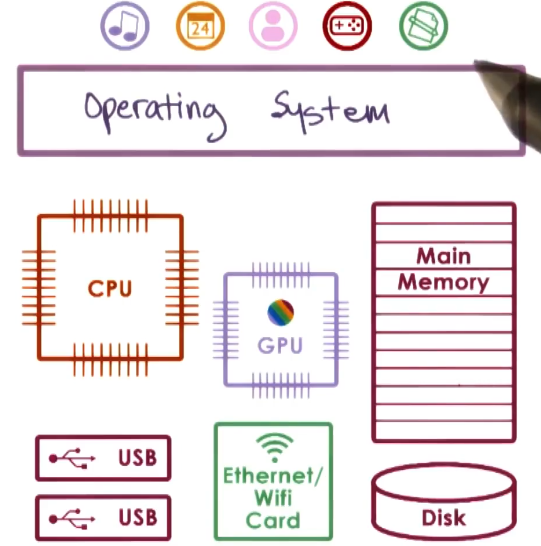
The OS is the software component which connects user applications (top of figure) to hardware components (bottom of figure) via abstraction and management. It is responsible for hiding hardware complexity, providing resource management to higher-level applications, and providing isolation + protection relative to applications.
OS Examples
Operating systems can be broadly grouped by their platform - for example, this class will consider deskstop and embedded systems. The primary operating systems include…
- Microsoft Windows: launched in 1985, became popular during the 1990s.
- UNIX-based: family of operating systems stemming from Unix (conceived at Bell Labs / AT&T in the 1960s).
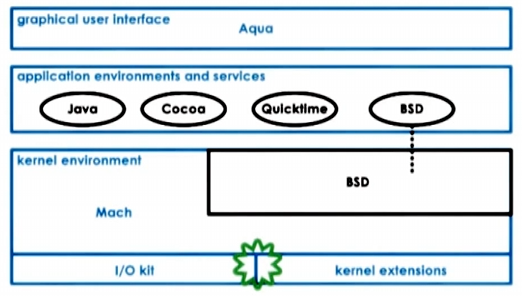
- MacOS (2001): extends the UNIX Berkeley Software Distribution (BSD) kernel.
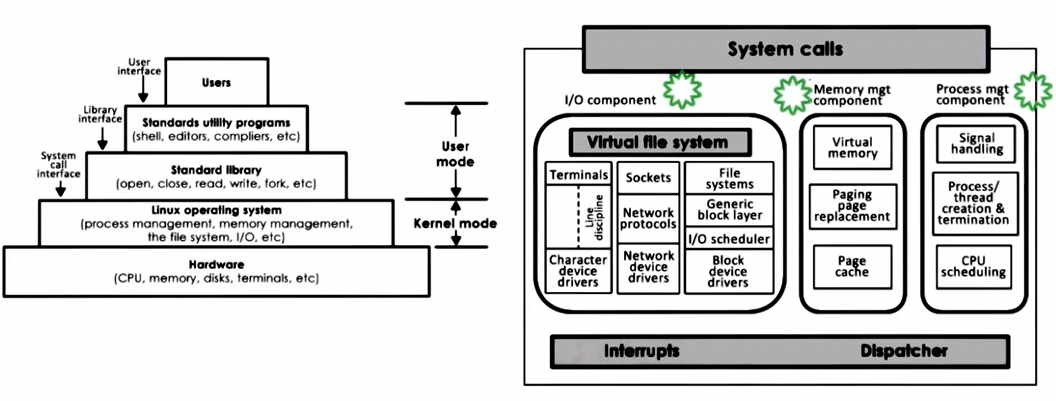
- Linux (1991): open-source project influenced by UNIX; created by Linus Torvalds.
In this class, we will focus on Linux and its various design considerations.
Operating Systems: A Closer Look
Design and Functionality
Operating systems are designed around abstractions, mechanisms, and policies. For example…
- Abstraction $\rightarrow$ memory page; corresponds to some addressable region of fixed size.
- Mechanism $\rightarrow$ allocate memory page, map to process.
- Policy $\rightarrow$ least recently used (LRU) to swap page content from RAM to disk.
A few key design principles guide the creation of operating systems:
- Separation of Mechanism and Policy: implement flexible mechanisms to support many candidate policies. This ensures policies can be substituted / swapped out without any consequences to functionality.
- e.g., memory management via least recently used (LRU) vs. least frequently used (LFU)
- Optimize for the Common Case: understand and account for the common case the OS is expected to support.
Protection Boundary
Computer platforms distinguish between at least two modes, defining the user-kernel protection boundary:
- Kernel Mode: privileged mode enabling direct access to hardware components. Typically represented by a single bit (0/1) set within the CPU.
- User Mode: unprivileged mode, which has limited access to system resources. Invalid access attempts will result in trap, which switches control from user application to OS.
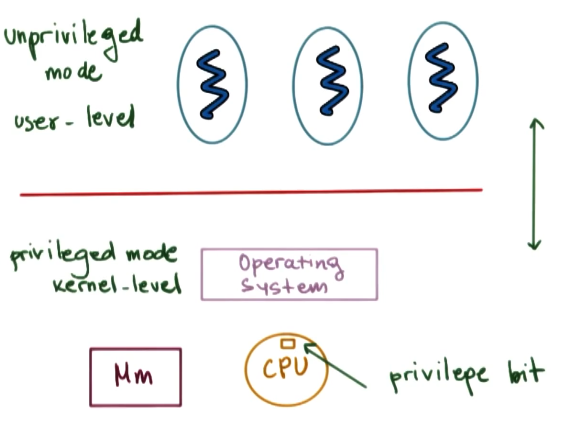
Operating systems export a system call interface for applications to perform operations interacting with system resources. Example system calls include open (file), send (socket), and malloc (memory). System calls are requested by user processes to pass control to the operating system, which then performs the desired task and returns data / control back to the user process.
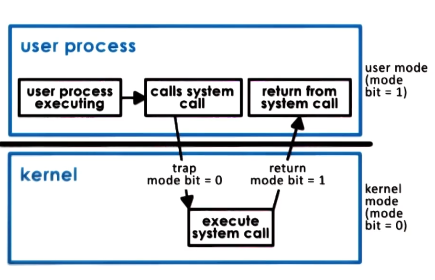
User/Kernel transitions are necessary whenever the application requires system calls. However, they are not cheap - the transition often implies non-negligible time overhead (for the OS to perform transition-related operations), and may also result in a cold cache.
Most operating systems share system call functionality, but may have different commands / implementation styles.
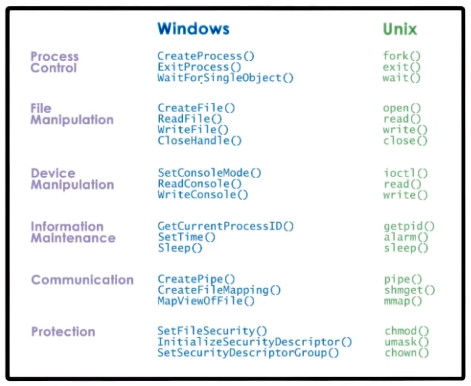
Organization and Architecture
Operating systems may be further characterized by their general organization. A Monolithic OS is organized such that every possible process required by the user-space or hardware is pre-built into the operating system. The term “monolithic” is an adjective describing a singular large, block-like structure.
Conversely, a Modular OS provides basic built-in services, but integrates with specialized modules installed on top of the base operating system. Any module must follow a specific interface in order to be compatible with the operating system.
Finally, a Microkernel is designed such that only the most basic services are supported by the operating system. All other software components / services are run at the user-level. Microkernel operating systems are typically very specific to the underlying hardware, and have a frequent need for user/kernel transitions.
Example Architectures
See below for the Linux architecture…
… as well as the macOS architecture.
(all images obtained from Georgia Tech GIOS course materials)