GIOS M12: Virtualization
Module 12 of CS 6200 - Graduate Introduction to Operating Systems @ Georgia Tech.
What is Virtualization?
Overview
Virtualization enables concurrent execution of multiple operating systems (and their applications) on the same physical machine. Each combination of OS, applications, and virtual resources is called a virtual machine.
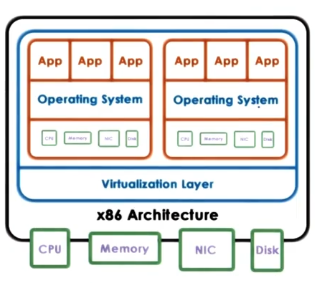
With virtualization, each OS running on the system integrates with the same underlying hardware resources. The virtualization layer (also known as virtual machine monitor [VMM]) supports management of physical hardware to share across virtual machines.
Virtualization is a relatively old concept - it originated at IBM in the 1960s in the context of mainframe computing and timesharing. Companies such as IBM were interested in increasing the efficiency of computing resource usage, and virtualization offered a means of limiting hardware while increasing compute. Today, virtualization is the foundation of modern cloud computing platforms such as AWS and Azure.
Formal Definition + Benefits
A virtual machine is an efficient, isolated duplicate of the real machine. Popek and Goldberg (1974)
Any virtual machine has the following characteristics:
- Fidelity $\rightarrow$ provides environment essentially identical to the original machine.
- Performance $\rightarrow$ programs show at worst only minor decreases in speed.
- Safety & Isolation $\rightarrow$ VMM is in complete control of system resources.
Virtualization is beneficial for a number of reasons:
- Consolidation $\rightarrow$ fewer hardware resources can achieve similar levels of compute. This serves to decrease cost and improve manageability.
- Migration $\rightarrow$ easier to move / copy virtual machine across hosts, which enables easier transferability, availability (e.g., scaling), and reliability (e.g., recovery from hardware issues).
- Security $\rightarrow$ since OS and applications are encapsulated within a virtual machine, it is easier to contain any bugs / security failures within the VM.
Due to limited popularity in mainframe technology and cheap hardware, virtualization was not widely adopted in the past. More recently, server underutilization and datacenter growth contributed to an increase in virtualization efforts.
Virtualization Implementation
Models
There are two primary models for implementing virtualization:
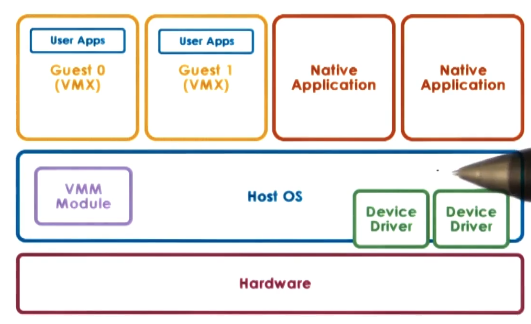
- Bare Metal / Hypervisor-Based: VMM (hypervisor) manages all hardware resources and supports execution of VMs. Typically runs some privileged VM to assist with hardware management.
- ex: XenServer (Citrix) and ESX (VMware).

- Hosted: host operating system utilizes VMM module to manage hardware resources on behalf of VMs. Also supports running on native applications on the host OS.
- ex: kernel-based VM (KVM).
Hardware Protection
To uphold proper security standards, virtualization must guarantee the following:
- Present virtual platform interface to VMs $\rightarrow$ VMs should not have direct access to hardware. This implies we must have virtual versions of system resources (e.g., CPU, memory, devices).
- Provide isolation across VMs $\rightarrow$ events within one VM should not impact any other VM (e.g., pre-emption, address translation).
- Protect VMs from applications $\rightarrow$ any faults with an application running on a VM should not compromise the VM itself. This implies different levels of protection for VM vs. applications.
- Protect VMM from VMs $\rightarrow$ any faults with VM should not impact the VMM. This implies different levels of protection for VMM vs. VM.
Common hardware tends to have more than two protection levels. For example, x86 CPU architectures offer four protection rings (levels 0 through 3) and two protection modes (root vs. non-root). Protection rings have decreasing privilege with increasing level; for root mode, all hardware access operations are permitted.
CPU Virtualization
In this context, we might implement Processor Virtualization as follows:
- Non-Root: VMs
- Ring 0: VM OS
- Ring 3: VM applications
- Root: VMM
- Ring 0: VMM
For non-privileged operations, VM instructions may bypass the VMM to directly execute on hardware. Privileged instructions trigger a VM exit, which refers to control switch from the VM to VMM. The VMM may then proceed as appropriate by 1) terminating the VM if the privileged instruction is illegal, or 2) emulating the required hardware if the instruction is permitted. Note that VM exits are analogous to the trap mechanism for regulating user-kernel control.
Certain instructions may alter critical system resources. If the VMM fails to account for this, there could be negative impacts on other VMs running on the same physical machine. Two approaches were taken to mitigate this issue:
- Binary Translation: map critical instructions (binary) from VM to alternative instructions safe for host OS / VMM to execute. Only perform translation if critical instruction is detected.
- Pioneered at Stanford, commercialized as VMware.
- Goal was to maintain full virtualization, which means the VM is not directly modified.
- Paravirtualization: VM makes hyper-calls to VMM (analogous to system calls) instead of executing critical instructions.
- Full virtualization is not maintained, since guest OS is modified.
Memory Virtualization
Memory Virtualization refers to the implementation of memory within a virtual system.
To achieve full memory virtualization, each VM must have a contiguous physical address space starting at 0. Full memory virtualization systems may therefore distinguish between virtual vs. physical vs. machine address.
- Option 1: VM performs address translation as usual (VA $\rightarrow$ PA). VMM is then responsible for mapping to machine address (PA $\rightarrow$ MA).
- Issue: each memory access requires two translations, which is extremely expensive.
- Option 2: VM performs address translation using VM page tables (VA $\rightarrow$ PA). VMM maintains shadow page table to directly map virtual address to machine address (VA $\rightarrow$ MA).
Alternatively, we can take a paravirtualization approach by modifying the VM itself. This no longer requires each VM to have continuous physical memory starting at 0. Instead, a paravirtualization memory system might explicitly register page tables with the VMM to determine the appropriate VA $\rightarrow$ MA translation.
Device Virtualization
Device Virtualization poses additional challenges due to the diverse nature of devices. In contrast to CPU / memory, there is no standard specification of device interface and behavior. To account for this diversity, device virtualization is typically accomplished using one of three primary models:
- Passthrough Model: VMM-level driver configures device access permissions such that VM can directly bypass the VMM. Device sharing across VMs is difficult as part of this implementation.
- Hypervisor Direct Model: VMM intercepts all device accesses, then emulates device operation (by translating to generic I/O operation or invoking appropriate VMM driver). VMM regulation adds latency to device access operations.
- Split Device Driver Model: device access control is split between front-end driver in VM (device API) and back-end driver in service VM / VMM. Front-end driver must package requests into pre-specified format to interact with service VM for device access. Eliminates emulation overhead from hypervisor direct model.
Hardware Virtualization
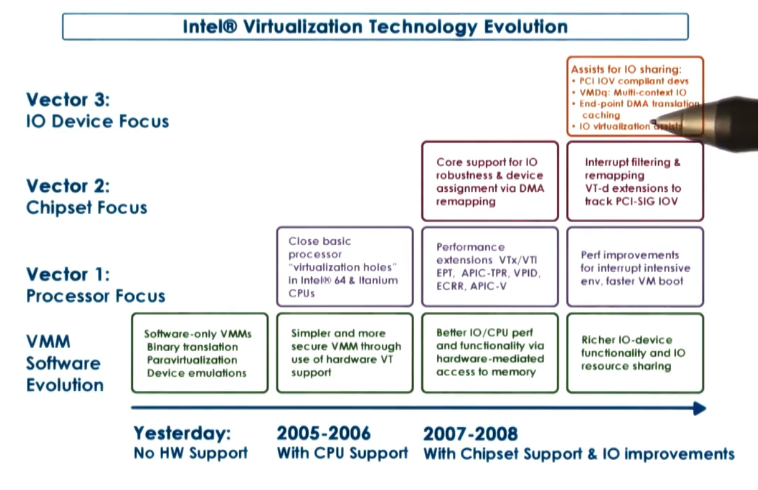
Finally, modern hardware components such as the CPU have been explicitly designed to better support virtualization efforts. For example, consider Intel’s evolution of virtualization technology.
(all images obtained from Georgia Tech GIOS course materials)