Overview#
I/O Management refers to the abstraction and arbitration of any input / output (I/O) device by the operating system. I/O management can take many different forms:
- Device Interfaces provide standardized code for device to interact with.
- Dedicated Handlers device drivers + interrupt handlers used to access and interact with devices.
- Abstract I/O: decouple I/O device details from upper levels of system software.
We define an I/O device as any device which provides input and/or receives output within a computing system. Example I/O devices include keyboards, mice, displays, the network interface card, etc.
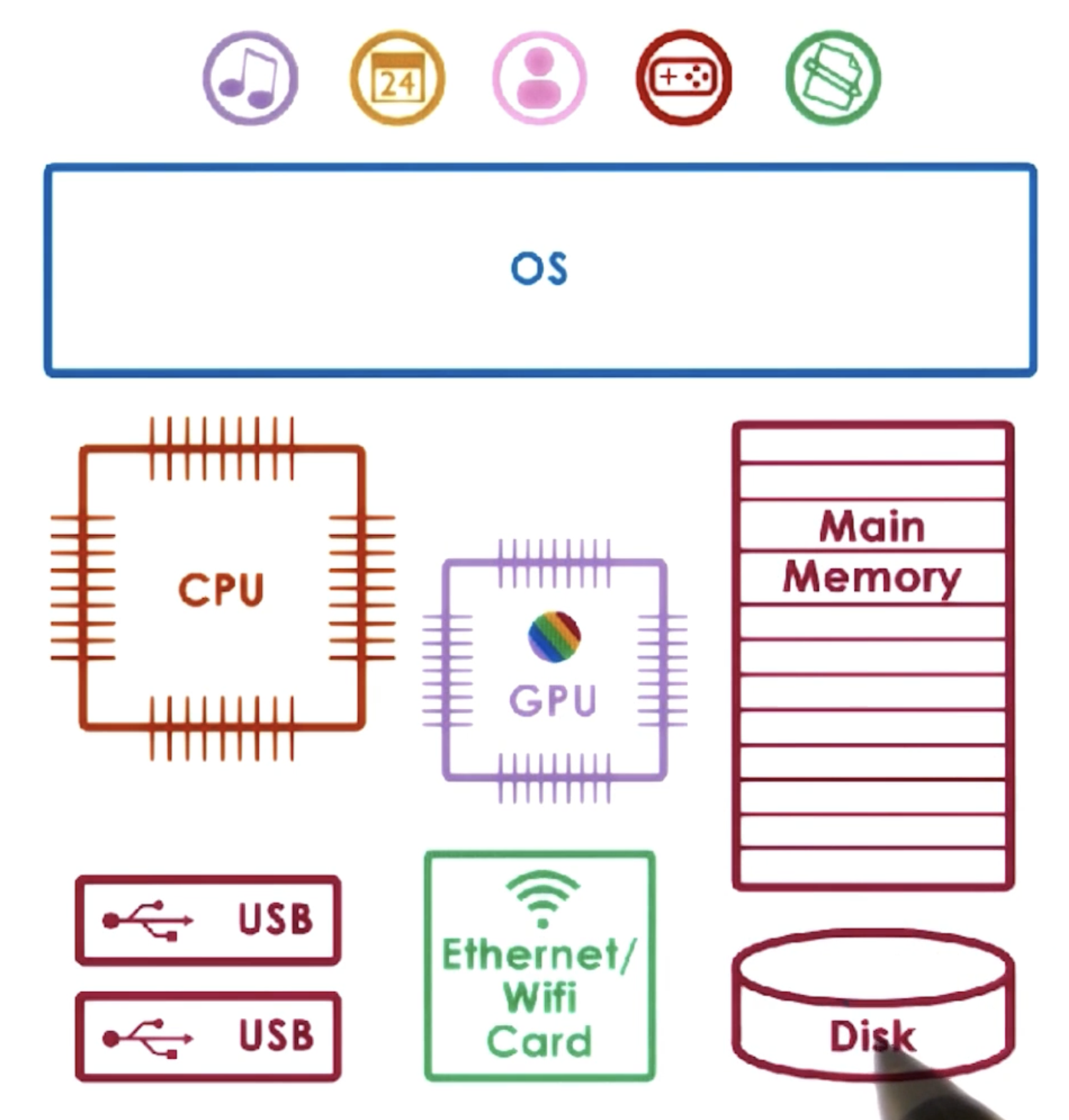
Although the I/O device population is extremely diverse, we can describe their typical components using the canonical device model:
- Control Registers directly accessed by the CPU; permit CPU / device interactions. Facilitate commands + data transfers and store important device statuses.
- Microcontroller main processor (CPU) of device. Executes operations on the device.
- On-Device Memory storage for the device.
OS-Device Interaction#
CPU-Device Interconnect#
In computing, an Interconnect refers to any communication path linking components of the computing system to enable data exchange or system functionality. Devices typically connect to the CPU via some intermediate controller (part of the device hardware), which then links to some central interconnect. For example, the Peripheral Component Interconnect (PCI) is one of the standard methods for connecting devices to the CPU.
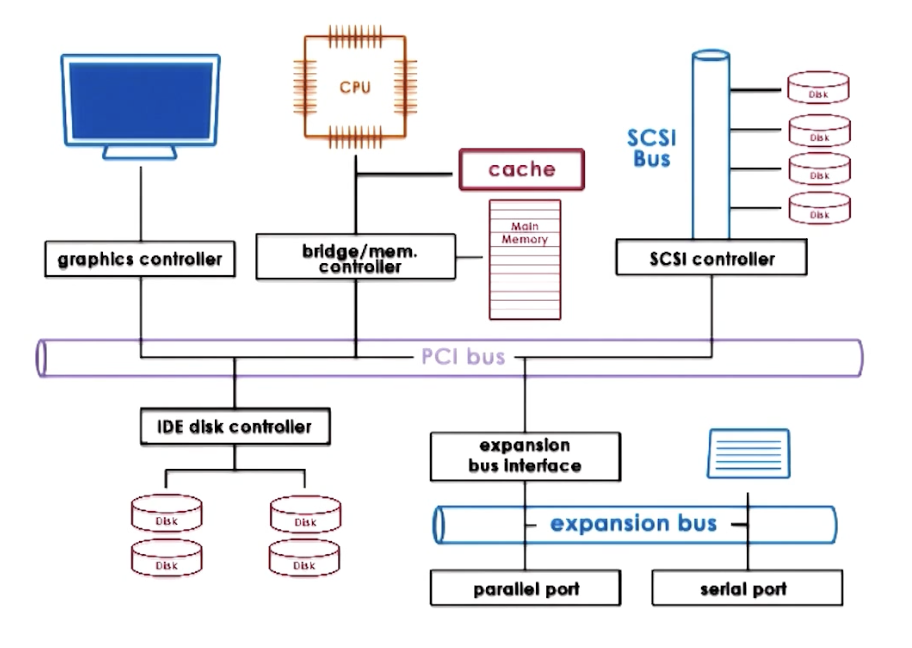
Interconnections function by representing device registers as memory locations (device registers share same address space as RAM). When the CPU writes to these locations, the integrated PCI detects the access and maps writes to the appropriate device. This general process is known as Memory-Mapped I/O.
So how does the CPU issue instructions to a device?
- Direct Memory Access (DMA): CPU indicates to DMA controller which data should be moved from RAM to device.
- Programmed I/O: CPU directly accesses (R/W) device command registers.
Drivers#
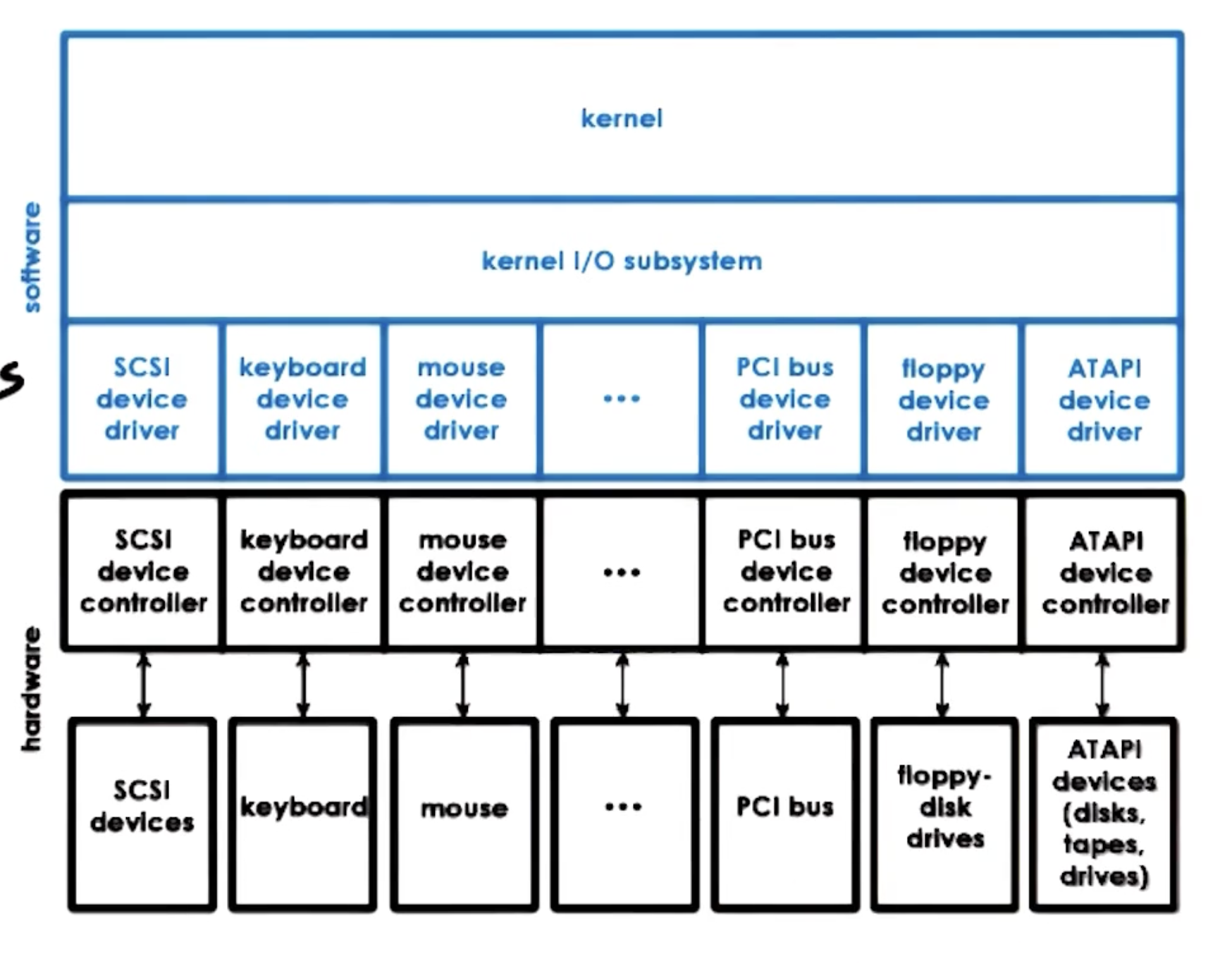
Device Drivers are device-specific software components which enable the operating system to access / control a device. Drivers are provided by device manufacturers, and must be provided for each OS. The OS typically provides an interface to define the set of standards / supporting mechanisms for a particular device driver. This serves to 1) provide clear expectations and framework for device driver developers, and 2) enable the OS to support many different device implementations without sacrifice to functionality.
Device Types + OS Representation#
So what types of devices does an OS support? Any OS provides well-defined interfaces for the following device types:
- Block Devices: read/write blocks of data; provide direct access to arbitrary block. OS provides a generic block layer on top of individual block devices to standardize across different block devices.
- Character Devices: support get/put character operations (e.g., keyboard).
- Network Devices: process stream of data in chunks (e.g., network interface card).
Internally, the OS maintains a representation of each device via a specific device file. For example, device files are stored in the /dev directory of root on UNIX-like platforms. This representation enables the OS to apply any other mechanisms pertaining to file systems to devices (e.g., read/write)!
EVERYTHING IS A FILE IN UNIX-LIKE OPERATING SYSTEMS
Device Integration with User Processes#
Overview#
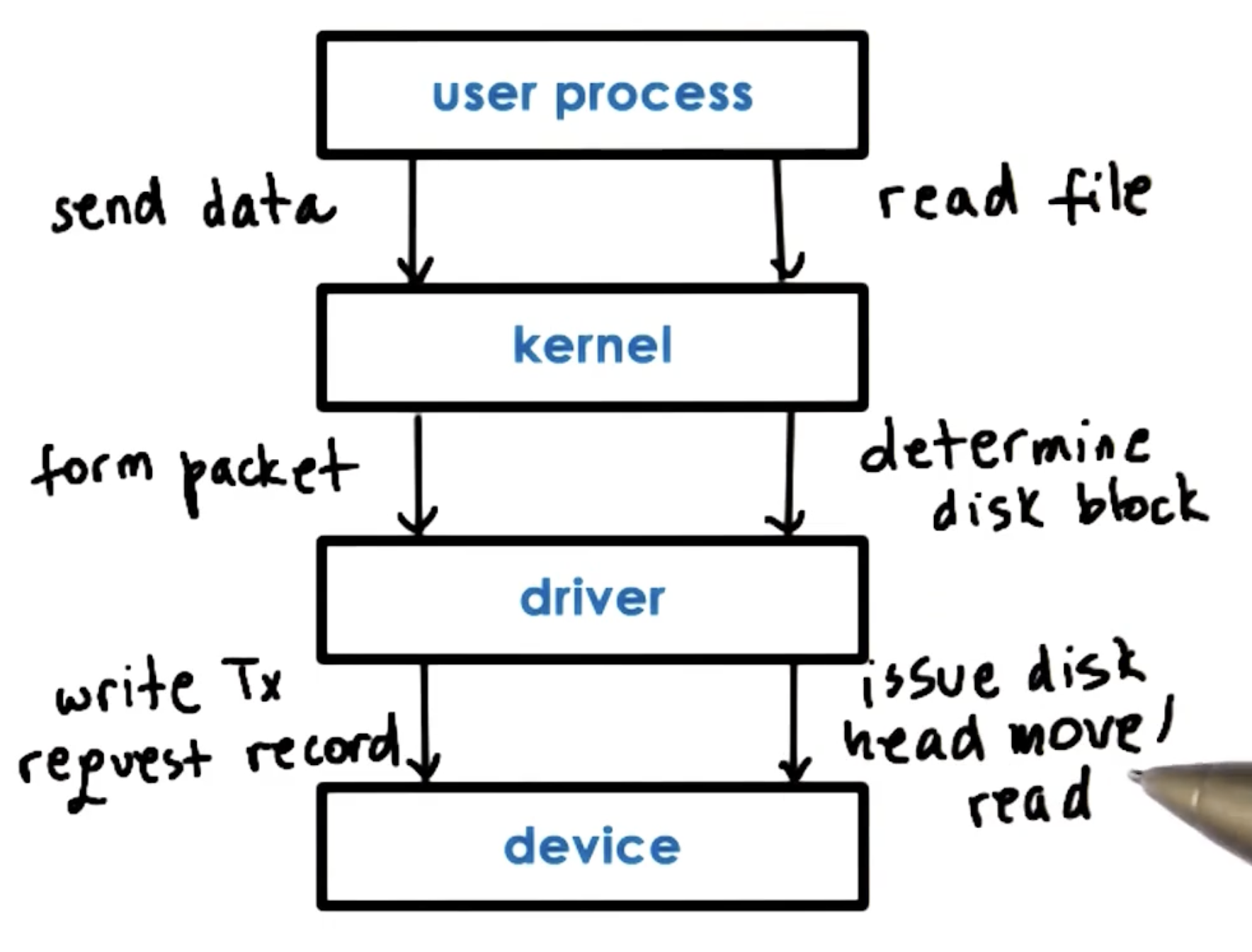
How can user processes interact with devices? The process must perform a System Call specifying the appropriate operation (e.g., read). The OS must perform necessary preprocessing to prepare any relevant data for transfer, then invoke the device driver. Finally, the device driver issues the appropriate commands to the device. Any results / events originating from the device will traverse the call chain in reverse order back to the user process.
OS Bypass#
Some devices can be configured to be directly accessible by user programs - this is known as OS Bypass. This approach must use a user-level driver / library for device interaction, since we are not relying on the OS (and its associated drivers) for any direct support. However, the OS does retain some coarse-grain control over the device.
Blocking Status#
What happens when a user process makes a call involving an I/O device? This depends on synchronicity:
- Synchronous I/O Operations: user process will block until I/O returns.
- Asynchronous I/O Operations: process continues after issuing call. Eventually, the process is notified / checks and receives result.
Virtual File System#
Overview#
The Virtual File System (VFS) is a layer used by UNIX-like systems to hide all details on the underlying file system from the kernel and user-level applications. For example, this ensures that files appearing across multiple different storage (block) devices appear as a singular unit.
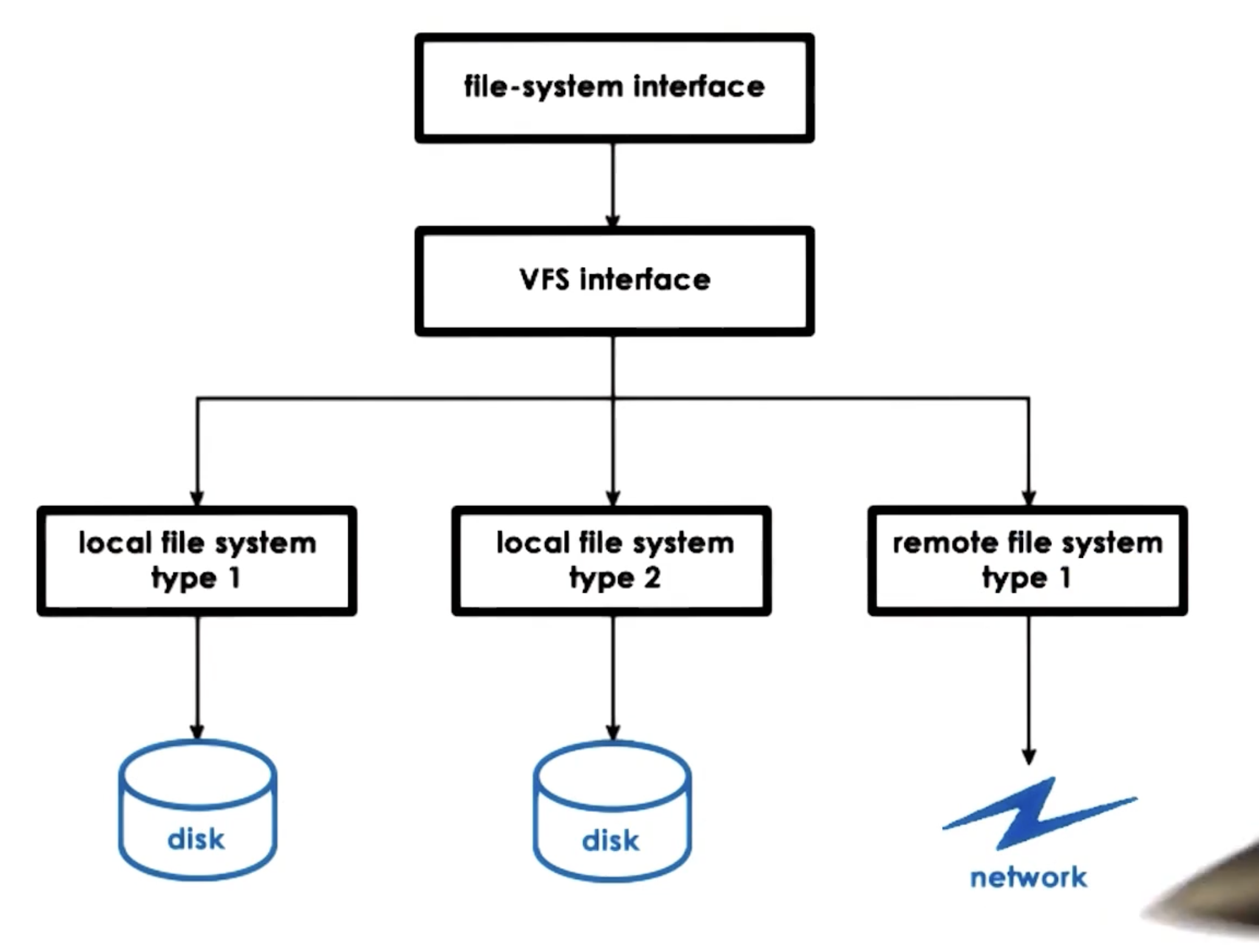
VFS supports the following key abstractions:
- File: element on which the VFS operates.
- File Descriptor: OS representation of file; used to open, read, write, send, lock, close, etc.
- Inode: persistent representation of file index. Includes file characteristics such as data blocks, device, permissions, size, etc.
- As long as we have an inode to track the location of file contents, we can have data blocks across many different devices!
- Dentry: directory entry; corresponds to single path component (ex:
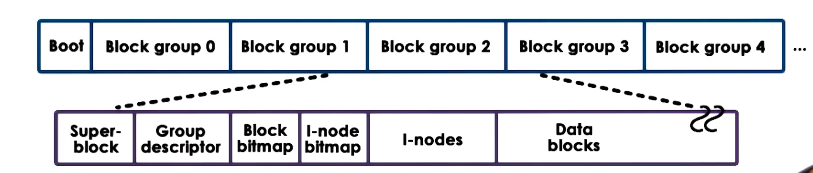
/users/nick/,/users,/users/nick). - Superblock: filesystem-specific information regarding filesystem layout across storage devices. Also maintains overall map of disk blocks to indicate locations of 1) inode blocks, 2) data blocks, and 3) free blocks.
Second Extended Filesystem#
While VFS is the OS subsystem that provides a standardized interface for file interaction, file systems such as ext2 are concrete implementations. Disk partitions organized via the ext2 file system have the following components:
- First Block boot block (used to store instructions / data to boot system).
- Block Groups contain superblocks, group descriptors, inodes, and data blocks.
Inodes#
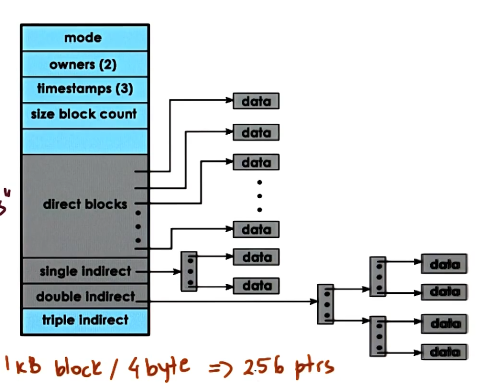
Any file is uniquely identified by its Inode. The inode contains the indices for all disk blocks corresponding to the file, as well as other file meta-data (ex: permissions, size, etc.). Inodes are uniquely indexed within the file system, meaning we can uniquely identify a file based on inode number.
Inodes contain both direct and indirect pointers to blocks on disk. Direct pointers directly point to data blocks. Indirect pointers point to blocks of more pointers; this means we can support much larger files compared to direct pointers alone!
Disk Access Optimizations#
File systems use various mechanisms to reduce file access overheads. For example, caching/buffering directly reduces the amount of disk accesses by keeping a buffer cache in main memory. I/O scheduling orders disk accesses to reduce disk head movement - the scheduler tends to maximize sequential vs. random block access to keep write operations close to one another. Prefetching leverages locality by reading in proximal blocks (given a single block access), thereby assuming that nearby blocks will also be relevant to the current operation.
(all images obtained from Georgia Tech GIOS course materials)