Overview#
A Distributed File System (DFS) is a file system stored across multiple machines. Recall that UNIX platforms use a Virtual File System (VFS) layer to abstract away any details on underlying file system implementation. This implies a DFS appears to the user / machine similarly to any other local file system.
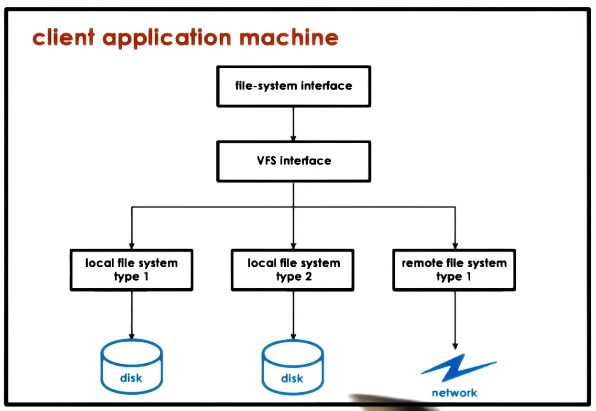
Distributed file systems are analogous to distributed storage facilities:
- Accessed via well-defined interface VFS
- Maintain consistent state tracking state, file updates, cache coherence
- Mixed distribution models replicated vs. partitioned, peer-like systems, etc.
DFS Implementation#
Distributed Architectures#
A DFS can follow one of many models:
- Client-Server: file system is used by the client, and stored on another single server.
- Client-Servers: file system is used by the client, and stored across many servers.
- Replicated: each server contains a copy of the entire file system; beneficial in terms of backups / availability, load balancing, fault tolerance, etc.
- Partitioned: different servers store different files; beneficial in terms of scalability and simpler write process.
- Peer System: files are accessed by AND stored on all machines across the system.
In this lesson, we will primarily focus on the Client-Server DFS model.
Remote File Access#
So how does a client access and modify files stored on a remote server? There are two extreme scenarios:
- Extreme 1: Pure Data Caching (Upload/Download)
- Client downloads file from remote server.
- Client performs any necessary accesses / edits to file.
- Client uploads new file back to server.
- Extreme 2: Pure Remote Access
- Client sends every requested operation (read / write) to server.
- Server accesses / edits file as necessary.
- Server returns appropriate results to client.
A more practical implementation blends both extremes to provide robust features:
- Allow clients to store portions of files locally lower latency for file operations and reduced server load by enabling client operations.
- Force clients to interact with server to maintain consistent state server has insight into client operations and can manage accesses / edits.
Server State#
In the context of a DFS and remote file access, State refers to information maintained by the file server on client characteristics and file operations. For example, state may include the files a client is currently accessing, their access types (R/W), and current modifications to a given file in the system.
A purely stateless file server maintains no state on DFS clients. This is only permissible in the case of pure remote access, and requires each client request to be fully self-contained.
- Pros: no resources used on server side to maintain state or manage consistency across clients; particularly resilient to failures (simply restart server).
- Cons: server cannot support caching and consistency management; client bears additional responsibility in transferring large quantities of information for each request.
Conversely, a stateful file server does maintain state on DFS clients. Any practical DFS implementation involving client-side caching requires a stateful file server.
- Pros: can support file locking, caching, and incremental operations.
- Cons: server runtime overheads; on failure, all state associated with the DFS must be restored (implies checkpointing and recovery mechanisms).
DFS Mechanisms#
Caching#
Caching is a general optimization technique which refers to maintaining copies of data in a fast-access location to reduce latency associated with access. In the context of a client-server DFS, clients may cache portions of DFS files (e.g., file blocks) to perform operations on cached state (e.g., open, read, write) without incurring additional overhead by interacting with the server. DFS caching requires cache coherence mechanisms to ensure all machines within the DFS always maintain updated versions of each file.
File Sharing#
To understand how file sharing across machines works within a distributed system, let’s compare relative to file sharing across processes within a single machine (UNIX file sharing semantics):
- Processes A and B both have access to a file.
- Process A modifies the file.
- Updated file contents are immediately available to Process B, since Processes A and B are reading from the same buffer cache (in RAM).
Immediate file updates are not possible in a distributed file system. For example, Client 1 may update a file, but Client 2 may read outdated file contents from the file server before Client 1 can push its changes.
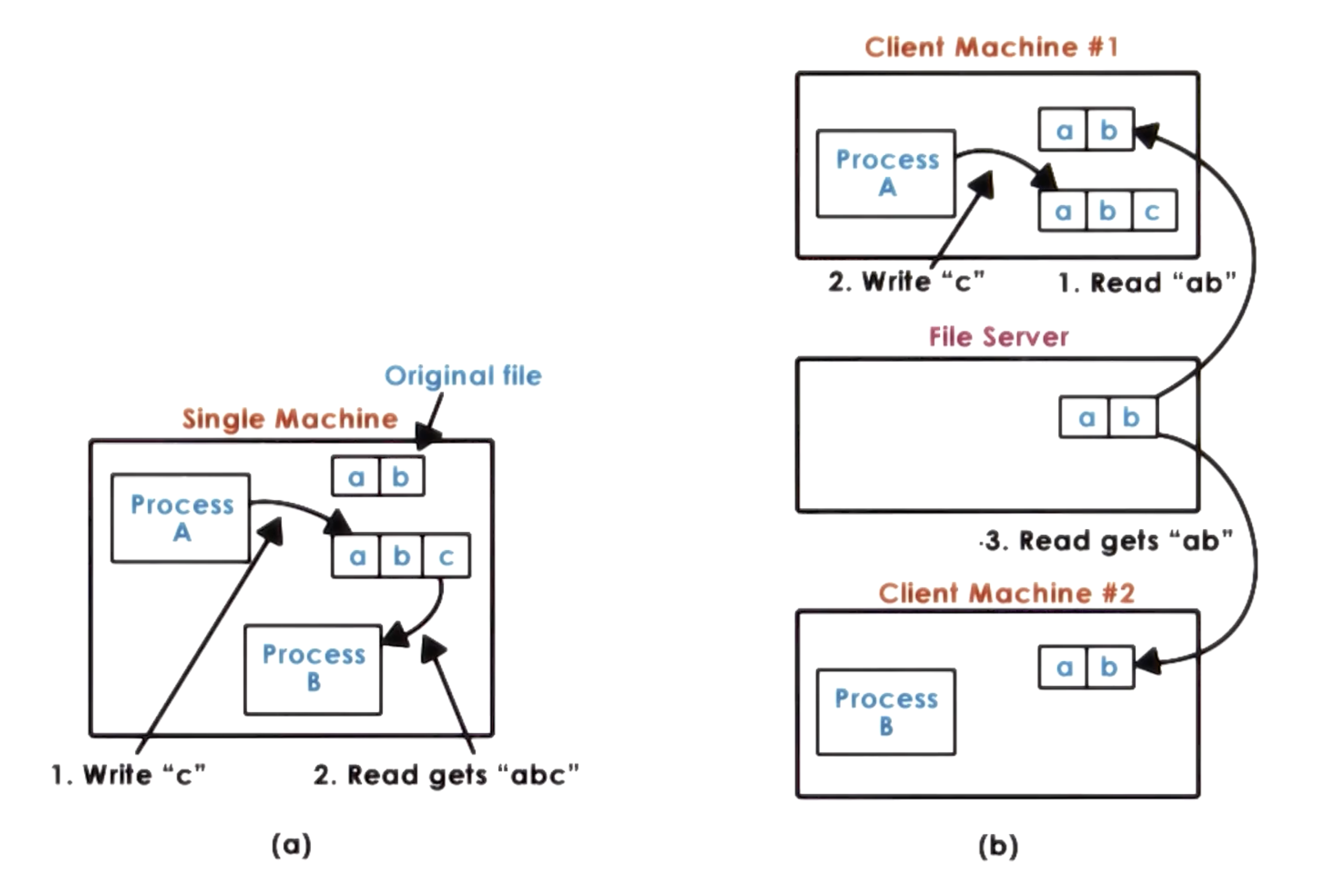
Since a distributed system cannot enforce immediate consistency, it must define alternative DFS file sharing semantics:
- Session Semantics: client writes back to file server on close, updates cache on open.
- Periodic Updates: client periodically writes back cached data to file server.
File sharing semantics are typically specific to the particular DFS implementation.
DFS Examples#
NFS#
As part of the Network File System (NFS), clients access a remote file system across a network. NFS relies on Remote Procedure Call (RPC) to interact with the remote file system.
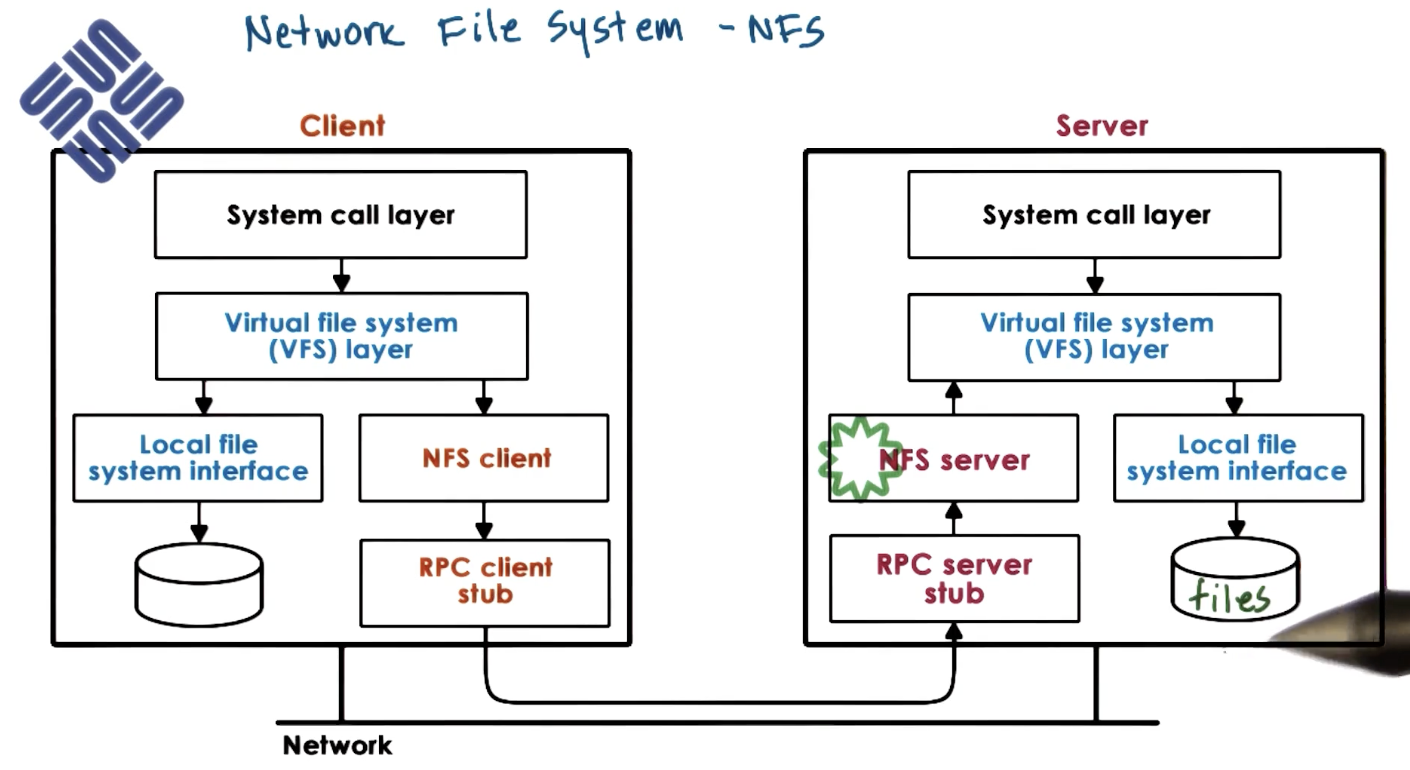
NFS supports the following functionalities:
- Caching: combines session-based caching with periodic updates.
- Locking: defines a lock (file handle) for each file.
- Locking is typically advisory; NFS does not enforce lock usage, but applications may be designed around locks to minimize conflicts.
- Supports read (shared) and write (exclusive) locks.
(all images obtained from Georgia Tech GIOS course materials)