Section 5 of AWS Certified Machine Learning Engineer Associate course from Udemy.
Introduction#
SageMaker offers many built-in algorithms for machine learning (ML) model training. This section covers the basics of SageMaker, as well as the various ML algorithms offered by the service.
SageMaker AI#
SageMaker is built to handle end-to-end ML workflows, including the core components of any ML project:
- Data Gathering + Preprocessing: fetching the training data for ML modeling.
- Model Training + Evaluation: training the ML model and evaluating its quality.
- Model Deployment + Monitoring: deploying the trained ML model as a service and monitoring its performance in production.
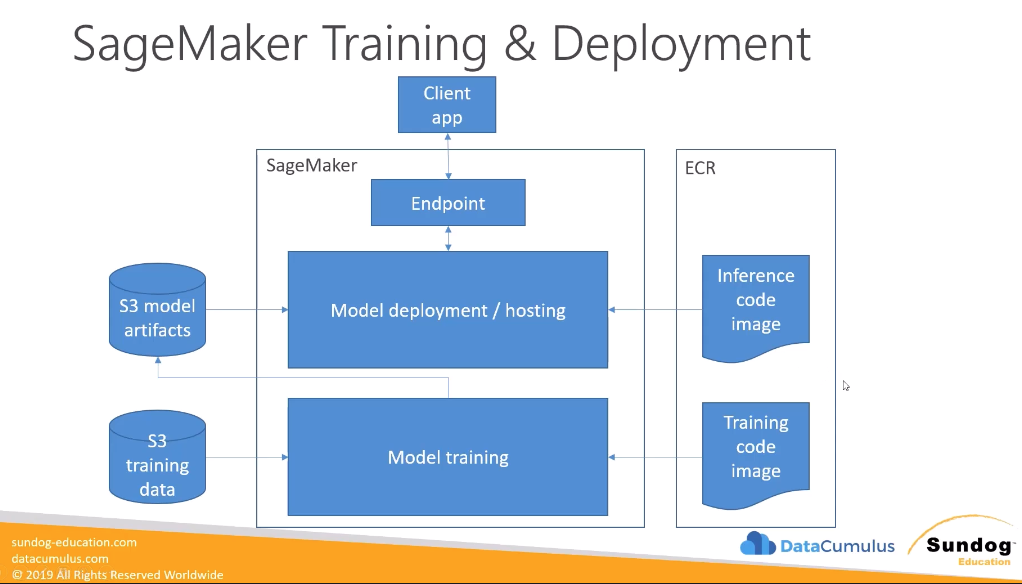
Training and inference code is housed within separate Docker images within Amazon Elastic Container Registry (ECR). Given trained model object(s) in S3, SageMaker AI facilitates model hosting by spinning up HTTP endpoints as needed.
Working in SageMaker AI#
How can we actually train our models and perform experimentation? SageMaker Notebooks are EC2 instances which have access to S3, a wide variety of built-in ML models (provided via template Docker images), and many common ML programming libraries (e.g., scikit-learn, spark, tensorflow). While notebooks offer flexibility in terms of code, many of these same functionalities can be accomplished in the SageMaker Console.
Data is typically sourced from S3, but may also come from other services such as Athena, Elastic Map Reduce (EMR), Redshift, and so on. The ideal format for most ML algorithms is Protocol Buffers (Protobuf), which is Google’s open-source method for serializing structured data into a compact binary format.
Most actions in SageMaker are accomplished through the use of jobs:
- Processing Job: copies data from S3 into processing container, performs data processing, and outputs processed data back to S3.
- Training Job: requires URL of S3 bucket with training data, ML compute, URL of S3 bucket for output, and ECR path to training code / image.
Given a trained model stored in S3, there are two primary methods for Model Deployment:
- Persistent Endpoint: on-demand inference; endpoint is always available.
- Batch Transform: performs inference for a dataset (“batch”) of instances. Does not require an endpoint.
Input Modes#
An Input Mode in SageMaker is a particular method for ingesting data as part of model training / inference. Different datasets may require different modes - for example, some ML training workflows involve massive datasets, whereas others are reasonably small and can fit in local memory. Modes provide alternative methods for data loading, enabling the user to make the most appropriate choice for their particular dataset and task.
- S3 File Mode: copies training data from S3 to local memory in Docker container.
- Pros: ease-of-access, simplicity.
- Cons: potentially redundant storage; may not need all data at once or have memory.
- S3 Fast File Mode: training data is streamed from an S3 bucket to local memory. Streaming may be random access or sequential.
- Pipe Mode: streams data directly from S3 in purely sequential fashion.
- Amazon S3 Express One Zone: high-performance storage class localized to one availability zone. Well-suited for file, fast file, and pipe modes.
- Amazon FSx for Lustre: provides massive throughput with low latency using single AZ; best-suited for massive datasets (ex: deep learning models).
- Amazon EFS: requires data to already be present in EFS.
Algorithms#
SageMaker offers a number of built-in algorithms to train ML models. This includes models for different categories of ML problems…
- Supervised Learning: prediction problem involving dedicated output. Task is to learn function mapping input features to output.
- Unsupervised Learning: data description problem. Task is to learn some representation or enhanced understanding of input features.
… which may be suited to different fields of application.
- Natural Language Processing (NLP): computer science discipline concerned with understanding and interpreting human language.
- Computer Vision (CV): subfield of artificial intelligence enabling computers to understand visual information from images and videos.
The following sections review some of the most popular ML algorithms available within SageMaker.
Supervised Learning#
Linear Learner#
Linear Learner is SageMaker’s algorithm for linear modeling, and may be applied to either classification or regression problems.
- Input Data: CSV or Protobuf, file or pipe mode.
- Preprocessing Requirements: training data should be normalized and shuffled.
- Instance Types: Single or multi-machine CPU or GPU.
Linear Learner uses stochastic gradient descent to compute model parameters. The user may select one of many optimization algorithms (e.g., Adam vs. AdaGrad). Common hyperparameters include L1/L2 regularization coefficients, learning rate, multi-class weight balance, and so on.
XGBoost#
eXtreme Gradient Boosting (XGBoost) is a boosted ensemble of decision trees. In this context, boosting refers to iteratively training weak learners using a dynamically weighted data distribution, with higher priority given to misclassified instances. Similar to Linear Learner, XGBoost can be used for both classification and regression problems.
- Input Data: CSV, LibSVM, Protobuf, or Parquet.
- Instance Types: since XGBoost is memory-bound (as opposed to compute-bound), M5 instances or single / distributed GPU instances are good choices for training.
XGBoost has a wide range of hyperparameters, including:
- Gamma: minimum loss reduction required to create a new split in the decision tree.
- Alpha / Lambda: L1 / L2 (respective) regularization coefficients penalizing weight magnitude, thereby mitigating overfitting.
- Evaluation Metric: value to optimize model parameters over. Could include AUC, RMSE, accuracy, etc.
- Maximum Depth: maximum number of layers in the tree (depth). Deeper trees are more prone to overfitting.
- Scale Positive Weight: adjusts the weight assigned to positive / negative instances (for binary classification). Helpful in the case of imbalanced datasets.
LightGBM#
Light Gradient Boosting Machine (LightGBM) is another boosted ensemble of decision trees used for classification and regression problems. Its extensions to the standard boosting framework include gradient-based one-side sampling and exclusive feature bundling.
- Input Data: TXT or CSV.
- Instance Types: single or multi-instance CPU for training; no support for GPU instances. Training is memory-bound, so choose general purpose instances over those optimized for compute.
Common LightGBM hyperparameters include:
- Learning Rate: scales the contribution of each new tree added to the ensemble.
- Number of Leaves: maximum amount of leaves within a single tree.
- Bagging Fraction: defines proportion of instances used to defined subset when bagging - randomly sampling data points to train an individual tree within the ensemble.
- Minimum Data in Leaf: minimum amount of instances required to define any leaf node.
KNN#
K-Nearest Neighbors (KNN) is a relatively simple algorithm for classification or regression problems. The algorithm uses distance to identify the closest points to an instance, then predicts its label by returning the mode (classification) or average (regression) across this set.
- Data Input: CSV or Protobuf, file or pipe mode.
- Separate channels for train and test data.
- Instance Types: training is compatible with CPU or GPU instances. For inference, CPU instances provide lower latency whereas GPU instances enable higher throughput.
In addition to the core algorithm, SageMaker includes a dimensionality reduction stage to avoid sparse data & the curse of dimensionality. The most important hyperparameter for KNN is - the number of neighbors to consider when computing a prediction.
Factorization Machines#
A Factorization Machine applies classification or regression to sparse data. It is commonly used for recommender systems, since a single user’s product interactions are likely sparse relative to a company’s entire set of offerings. Factorization is limited to pairwise interactions.
- Data Input: Protobuf with Float32; sparse data implies CSV is impractical.
- Instance Types: CPU instances are recommended for training; GPU is only advised in the case of dense data.
Important hyperparameters for factorization machines include bias, factors, and linear terms.
DeepAR#
Deep Autoregressive (DeepAR) uses RNNs to forecast one-dimensional time series data. This method is particularly useful for capturing frequency patterns and seasonality. DeepAR may be trained on multiple different time series, which may help to capture interdependent relationships between time series features.
- Input Data: JSON or Parquet.
- Each instance must contain the starting timestamp, observed value of the target feature, and any dynamic features to be used in combination with the target feature.
- The entire time series is required for training, testing, and inference. Predictions within some window are compared to their corresponding actual values.
- Instance Types: CPU or GPU instances, single or multi-machine. Recommended to start with a CPU instance and only move to GPU if necessary.
- DeepAR only supports CPU instances for inference.
Common DeepAR hyperparameters include:
- Context Length: number of time points the model utilizes to make a prediction.
- Epochs, Learning Rate, and Batch Size.
Object2Vec#
Object2Vec creates a low-dimensional embedding given a high-dimensional instance (object). Object2Vec is essentially Word2Vec generalized to handle any object type (JSON; e.g., documents, IDs, sentence pairs, etc.). It is particularly useful as a preprocessing step for downstream ML applications.
- Input Data: JSON token pairs.
- Instance Types: can only train on single-machine CPU or GPU workloads.
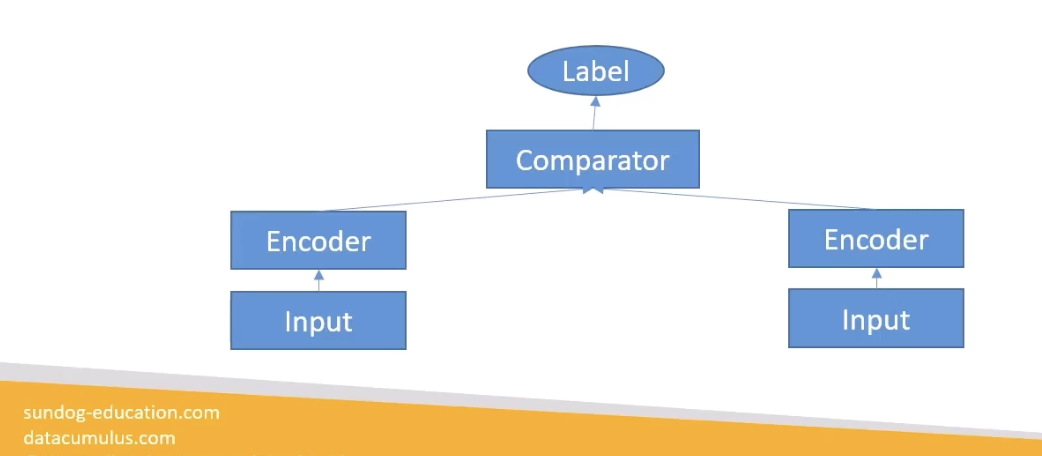
In terms of architecture, Object2Vec has two separate input channels, each containing an encoder. The embedded values from each channel are concatenated and fed into a comparator network, which generates the final output.
Unsupervised Learning#
K-Means Clustering#
K-Means is an approach for clustering, which identifies similar groupings of instances within a dataset. In this context, similarity is defined in terms of distance.
- Data Input: CSV or Protobuf, file or pipe mode.
- Separate channels for train and test. Training data should be sharded; test data fully replicated.
- Instance Types: CPU recommended for training, but also compatible with GPU.
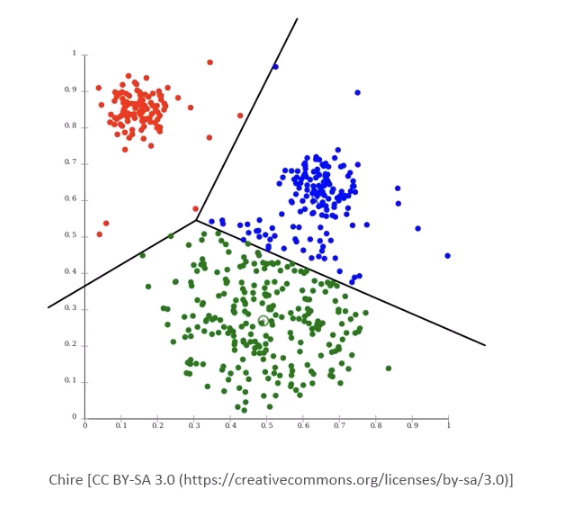
SageMaker extends the basic K-Means algorithm by starting with clusters, then reducing clusters from to using Lloyd’s method. Extra cluster centers may help improve the algorithm’s fit.
PCA#
Principal Components Analysis (PCA) is a dimensionality reduction technique which projects higher-dimensional data into a lower-dimensional subspace while minimizing loss of information.
- Data Input: CSV or Protobuf, file or pipe mode.
- Instance Types: training is compatible with CPU or GPU instances.
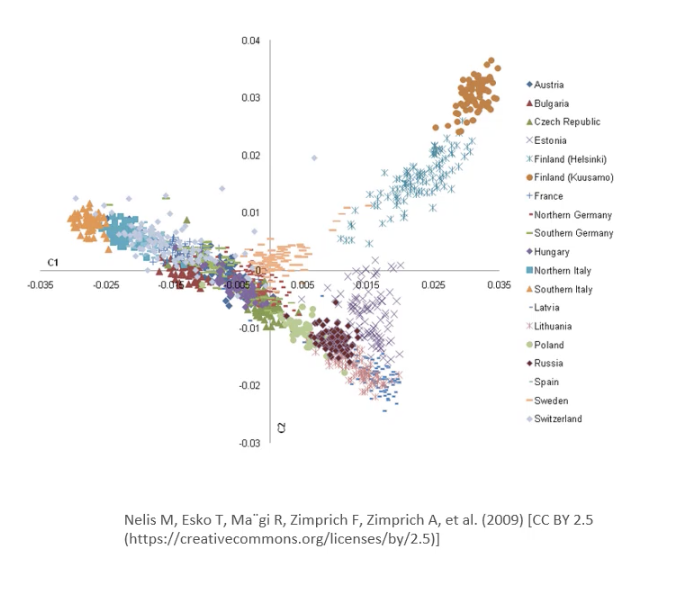
PCA functions by performing singular value decomposition (SVD) on the covariance matrix of the dataset. SageMaker offers two modes for SVD: regular (for sparse data) and randomized (for large datasets; uses approximation approach).
Random Cut Forest#
Random Cut Forest is SageMaker’s algorithm for anomaly detection, which identifies unusual instances within a dataset. The algorithm functions by creating an ensemble of decision trees, with each tree representing a partition of the training data, then computing the expected change in tree complexity as a result of adding another data point.
- Input Data: CSV or Protobuf, file or pipe mode.
- Optional test channel for computing classification metrics on labeled data, where label indicates anomaly status.
- Instance Types: requires CPU instance for training (no GPU due to algorithm’s simplicity).
Important hyperparameters for Random Cut Forest include:
- Number of Trees: increasing reduces noise.
- Samples per Tree: chosen so that inverse approximates ratio of anomalous to normal data.
IP Insights#
IP Insights is a tool used to flag suspicious behavior from IP addresses. It relies on an underlying neural network, which learns a latent vector representation of entities and IP addresses.
- Data Input: CSV consisting of entity label and IP address.
- Instance Types: GPU recommended for training due to underlying neural network, but also compatible with CPU instances.
The primary hyperparameters for IP insights include the amount of entity vectors, vector dimensionality, and others generalizable across neural network training.
Textual Analysis#
Seq2Seq (Supervised)#
Sequence-to-Sequence (Seq2Seq) models generate an output sequence of tokens from an input sequence. This is particularly useful for NLP applications including machine translation, text summarization, and speech-to-text. Seq2Seq models are built on Recurrent Neural Networks (RNNs), Convolutional Neural Networks (CNNs), and/or the attention mechanism utilized in many deep learning techniques.
- Input Data: Protobuf data of integer type, since features must represent tokens = integers.
- User must provide training data, validation data, and vocabulary files.
- Instance Types: requires single / multi-GPU instance types, but cannot be parallelized across multiple machines.
Due to their massive amount of parameters and training data size requirements, training deep learning models can take massive amounts of time and compute. SageMaker offers methods for fine-tuning via pre-trained foundation models, as well as public training datasets to facilitate common tasks.
Most Seq2Seq hyperparameters are generalizable to any neural network:
- Batch Size: amount of data used to calculate gradient for stochastic gradient descent.
- Optimization Type: framework for optimization (e.g., Adam, RMSprop).
- Encoder / Decoder Layers: amount of neural network layers present in the encoder and decoder portions of the model, respectively.
Seq2Seq models are optimized in terms of NLP evaluation metrics, which include accuracy, BLEU score, and perplexity.
BlazingText (Supervised & Unsupervised)#
BlazingText is an NLP tool which performs text classification and word embeddings. Text classification is a supervised learning task which predicts a label corresponding to a collection of words. Word2Vec creates a vector representation of a word to encode semantic meaning.
- Input Data:
- Text Classification: one sentence per line, with first word in sentence being “__label__” followed by the actual label value.
- Word2Vec: txt file with one training sentence per line.
- Instance Types:
- Text Classification: CPU for small datasets, single GPU instance for large datasets.
- Word2Vec: single CPU or single GPU instances are most appropriate.
There are a few different training modes for Word2Vec.
- Continuous Bag-of-Words (CBOW): predicts target center word based on surrounding context words.
- Skip-Gram: predicts target context words based on center word.
Topic Modeling (Unsupervised)#
Topic Modeling automatically organizes documents into learned topics. SageMaker offers Neural Topic Modeling as one choice of algorithm; these approaches have some underlying deep learning component in their architecture. As part of neural topic modeling, the user specifies their desired number of topics. Topics themselves are a latent representation based on top-ranking words within a topic cluster.
- Input Data: CSV or Protobuf, with words tokenized into integers.
- Four channels: train, validation, test, auxiliary for vocabulary.
- Instance Types: GPU recommended for training, CPU okay for inference.
Latent Dirichlet Allocation (LDA) is SageMaker’s other topic modeling algorithm, and is not based on deep learning. The primary hyperparameters for this algorithm are topic count and concentration (alpha0).
- Input Data: CSV or Protobuf with token : frequency for each word in the vocabulary, repeated for each document.
- Two channels: train and test.
- Instance Types: single-instance CPU training only.
Image Processing#
Object Detection (Supervised)#
The goal of any Object Detection problem in computer vision is to identify all objects within an image, and designate them with bounding boxes. Object detection algorithms use a single deep neural network for both detection and classification, where classes are accompanied by probability (confidence) scores.
- Input Data: Protobuf or image format (JPG / PNG) with accompanying JSON annotation data.
- Instance Types: GPU instances (single / multi-machine, single / multi-core) are recommended for training, since it is computationally intense. CPU instances may be suitable for inference.
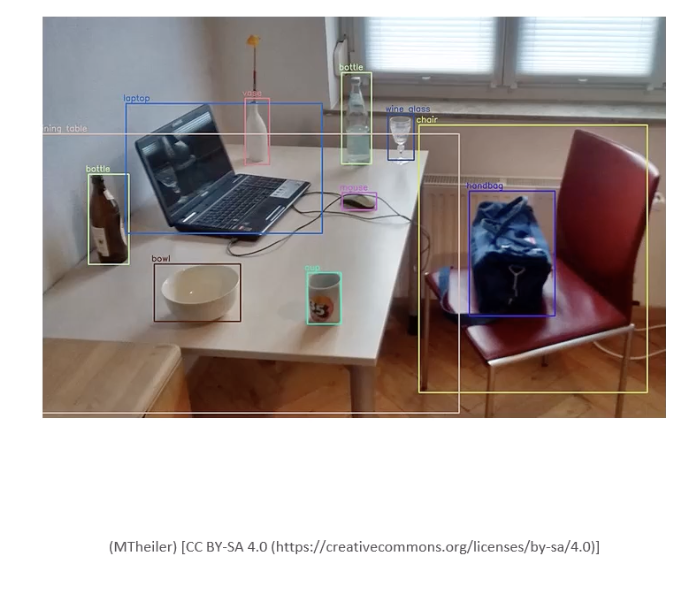
Similar to other deep learning approaches in SageMaker, we have the option of training from scratch or using a pre-trained model based on some predefined neural architecture. For object detection, SageMaker supports:
- MXNet: CNN in combination with single-shot multibox detector algorithm. Supports transfer learning and incremental training.
- TensorFlow: uses foundation models from the TensorFlow Model Garden: ResNet, EfficientNet, MobileNet, etc.
Image Classification (Supervised)#
Whereas object detection identifies the bounding boxes for objects within an image, Image Classification is a similar computer vision technique which labels the object(s) present in an image. SageMaker supports separate algorithms for MXNet and TensorFlow.
- Input Data: image format (jpg / png) with labels.
- Instance Types: GPU instances for training; CPU or GPU instances for inference.
Semantic Segmentation (Supervised)#
Semantic Segmentation is another computer vision technique which provides pixel-level object classification. The primary goal is to produce a segmentation mask to define regions of the image. Although this is a similar goal to object detection, semantic segmentation provides much more granular boundaries.
- Input Data: image format (JPG / PNG) with label maps (JSON) describe annotation.
- Instance Types: only single-machine GPU instances are supported for training. CPU or GPU machines may be used for inference.

SageMaker provides three different core algorithms for semantic segmentation:
- Fully-Convolutional Network
- Pyramid Scene Parsing
- DeepLabV3
In combination with these algorithms, SageMaker uses ResNet architecture pre-trained on the ImageNet dataset.
(all information obtained from AWS Certified Machine Learning Engineer Associate: Hands On! course on Udemy)