Introduction#
The first step of any machine learning project involves Data. Large amounts of data must be stored in a scalable and secure fashion. This section of the course covers basic data properties, ETL pipeline orchestration, and data storage methods on AWS.
Basics of Data Engineering#
Data Types and Properties#
There are three primary types of data:
- Structured Data: data organized in a well-defined manner or schema; found in relational databases. Easily queryable and has consistent structure.
- Examples: database tables,
.csvfiles with consistent columns, Excel spreadsheets.
- Examples: database tables,
- Unstructured Data: data without a predefined structure or schema. Difficult to query without preprocessing.
- Examples: text files, videos and audio files, images, emails, etc.
- Semi-Structured Data: data with some level of structure (ex: tags, hierarchies), but not as organized as structured data.
- Examples: XML and JSON files, email headers, log files.
We describe data in terms of the Three V’s:
- Volume: amount of data in consideration.
- Velocity: speed at which new data is generated, collected, and processed.
- Variety: types, structures, and sources of data.
Data Warehouses, Lakes, and Lakehouses#
There are many different (and at first, confusingly similar) terms for data storage solutions.
- Data Warehouse: storage repository where data is stored in a structured format. Data is collected from various locations, loaded into the warehouse (ETL), and organized for efficient querying.
- Schema-on-Write: schema is known before writing to disk. Data is utilized as part of Extract-Transform-Load (ETL) pipeline.
- Examples: Amazon Redshift, Google BigQuery, Azure SQL Data Warehouse.
- Data Lake: storage repository where data is stored its native format, which may be structured, unstructured, or semi-structured. Used to store large volumes of raw data without a predefined schema.
- Schema-on-Read: schema is defined at the time of reading data. Data is utilized as part of Extract-Load-Transform (ELT) pipeline.
- Examples: Amazon Simple Storage Service (S3), Azure Data Lake Storage, Hadoop Distributed File System (HDFS).
- Data Lakehouse: hybrid data architecture providing the performance + reliability of a data warehouse while maintaining the flexibility + low-cost storage of a data lake.
- Supports Schema-on-Write and Schema-on-Read.
- Examples: AWS Lake Formation, Delta Lake, Databricks Lakehouse, Azure Synapse Analytics.
ETL Pipelines and Orchestration#
An Extract-Transform-Load (ETL) pipeline is used to move data from source systems into a data warehouse. ETL can be performed in batches or via real-time streaming, depending on the velocity and use cases surrounding the data.
- Extract: retrieve raw data from source systems (ex: databases, flat files, APIs). Ensure data integrity as collected.
- Transform: convert extracted raw data into a suitable format for the data warehouse. May involve data cleaning, aggregations, encodings, etc.
- Load: move transformed data into target warehouse or repository.
Pipeline Orchestration is a method for automating ETL / ELT pipeline execution. AWS offers a number of services for orchestration, including…
- Schedulers: AWS Glue.
- Orchestration Services: AWS Step Functions, Lambda, Glue Workflows.
Data Sources and Formats#
Data source refers to the medium in which data is received. There are many different types of data sources:
- Database Connections:
- Java Database Connectivity (JDBC): common interface for programmatically interacting with a database. Platform independent, but language dependent (applications developed in Java).
- Open Database Connectivity (ODBC): another common interface for programmatically interacting with a database. Platform dependent (in terms of drivers), but language independent.
- Application Programming Interface (API): software interface offering service to other pieces of software; enables connection between one software component (API) and requesting client.
- Other: log files, streaming data.
In contrast, data format refers to the particular organization of stored data. Common data formats include:
- Comma-Separate Values (
.csv): row-based tabular storage format. Each line corresponds to a row, and values within a row are separated by commas.- Similar file types use alternative delimiters to separate values (ex:
.tsvfor tabs). - Appropriate for small-to-medium datasets and human readability.
- Similar file types use alternative delimiters to separate values (ex:
- JavaScript Object Notation (
.json): structured or semi-structured data based on key-value pairs.- Tagging via key-value pairs enables flexible structure.
- Utilized for data interchange between server and client. Also common format for application configuration files.
- Avro: binary format storing both data and schema, enabling system-agnostic processing.
- Used with big data and real-time processing systems.
- Systems such as Apache Kafka, Apache Spark, and Hadoop rely on Avro.
- Parquet: column-based tabular storage method optimized for analytics.
- Powerful for systems which read specific columns instead of entire records and distributed systems.
Amazon S3#
Amazon S3 is an infinitely-scaling storage solution offered by AWS. It has many different use cases, including backup & storage, disaster recovery, archival, hybrid cloud storage, application & media hosting, and so on.
Objects and Buckets#
S3 enables users to store objects (files) in buckets (directories). Buckets are defined at the region level, and are named according to an account regional namespace. Each object has a key, which is defined by the full path of the object including any subdirectories and excluding the bucket name.
s3://my-bucket/my_folder/another_folder/my_file.txtAlthough the URL and UI indicates subdirectory structure, buckets do not actually contain nested directories. Instead, the full key is utilized as the object’s path, and AWS creates an abstraction layer to provide the user with subdirectory functionality.
The maximum allowable size for an object is 50TB.
Security#
S3 access is regulated via a number of security policies:
- User-Based: IAM policies define which API calls should be enabled for a particular IAM user.
- Resource-Based: bucket policies enable access to an entire bucket.
- Object Access Control List (ACL) is more fine-grained.
- Bucket Access Control List (ACL) is less commonly used.
Bucket Policies are the most common approach for access regulation in S3. Any particular bucket policy is JSON containing information on bucket objects, access permission, and applicable accounts.
{ "Version": "2020-01-01", "Statement": [ { "Sid": "PublicRead", "Effect": "Allow", "Principal": "*", "Action": [ "s3:GetObject" ], "Resource": [ "arn:aws:s3:::examplebucket/*" ] } ]}How can we enable public access for a bucket?
- Disable “Block Public Access” options under bucket permissions.
- Create new bucket policy allowing any user to retrieve the object.
Versioning#
In the context of S3, Versioning refers to the process of incrementally updating an object while keeping historical records of previous iterations. Versioning is enabled at the bucket level.
Replication#
Replication copies the contents of one bucket into another. There are two primary types of replication:
- Cross-Region Replication (CRR): source and destination buckets are located in different regions. Particularly useful for compliance and low-latency access across regions.
- Same-Region Replication (SRR): source and destination buckets are located in same region.
Buckets may be owned by different AWS Accounts, and copying is asynchronous. Bucket replication chaining is NOT possible. Furthermore, replication only works if versioning is enabled.
Storage Classes#
S3 Storage Class refers to the type of storage guarantee assigned to a particular object. Storage classes primarily differ in terms of:
- Durability: rate at which object is lost by Amazon S3.
- Availability: measures how readily available a service is.
The main S3 storage classes include:
- Standard:
- S3 Standard - General Purpose: 99.99% availability; used for typical projects.
- S3 Standard - Infrequent Access: 99.9% availability; used for disaster recovery / backups.
- S3 One Zone - Infrequent Access: very high durability and lower availability (99.5%). Data is stored in a single access zone.
- Glacier: low-cost storage intended for long-term archival / backup.
- S3 Glacier Instant Retrieval: millisecond retrieval; minimum storage duration 90 days.
- S3 Glacier Flexible Retrieval: much longer retrieval times depending on tier (ex: 12 hours).
- S3 Glacier Deep Archive: long-term storage with lowest cost, longest retrieval times.
- Intelligent Tiering: automatically moves objects between access tiers based on usage.
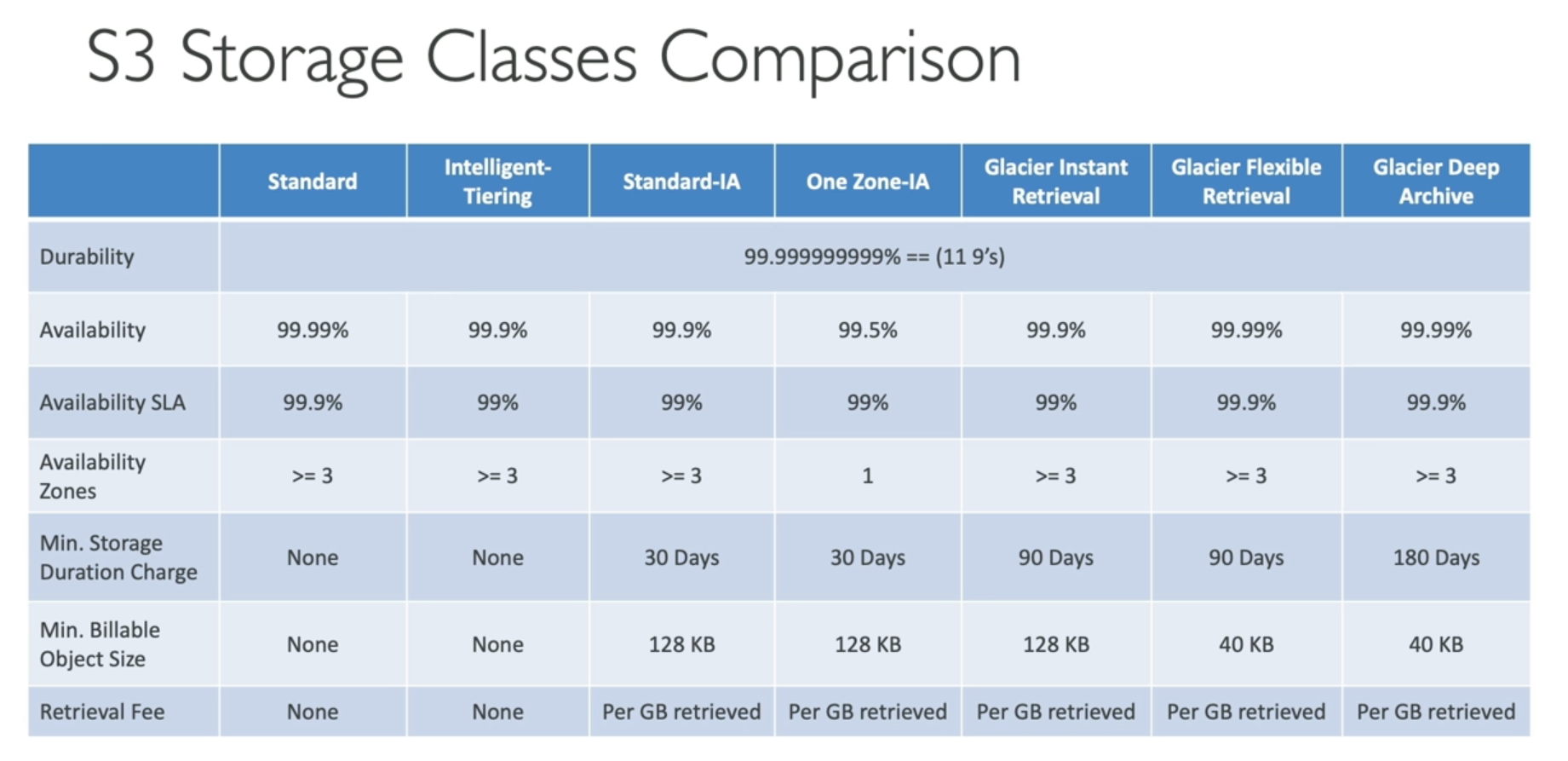
Lifecycle Rules are used to automate storage class transition depending on the age of an object. For example, we may create a bucket-wide policy which transitions objects from Standard to Standard-IA storage class after 30 days. In addition to storage class transition, lifecycle rules can be used to configure objects to expire (delete) after some time.
Event Notifications#
An S3 Event refers to some action involving an object such as creation, removal, or replication. S3 supports event notifications to automatically notify a downstream service. Event notifications require IAM permissions to allow the S3 bucket to access the proper resources for notification.
Event notification targets on AWS include SNS, SQS, and Lambda Function. All events eventually land in Amazon EventBridge, which supports delivery to many other AWS services.
Performance#
By default, Amazon S3 provides highly scalable performance:
- Latency: 100-200 ms.
- PUT/COPY/POST/DELETE operations: 3,500 per second per prefix in a bucket.
- GET/HEAD operations: 5,500 per second per prefix.
(in this context, prefix refers to the full subdirectory path within a bucket).
S3 uses a number of performance mechanisms, including:
- Multi-Part File Upload: parallelizes uploads to speed up transfer. Must use for files larger than 5GB in size.
- Transfer Acceleration: increase bucket transfer speed by using an intermediate AWS edge location to forward data to target region.
- Byte-Range Fetch: parallelizes GETs by only requesting a specific portion of the file.
Encryption#
Amazon S3 uses four primary methods for object encryption:
- Server-Side Encryption (SSE)
- SSE with Se-Managed Keys (SSE-S3): encrypts S3 objects using keys managed by AWS. User never has access to this key. Enabled by default for new buckets / objects.
- SSE with KMS Keys stored in AWS KMS (SSE-KMS): utilizes AWS Key Management Services (KMS) for key management. User has more control over key creation and monitoring.
- Upload / download operations call the KMS APIs, contributing to KMS quota per second. This may cause API throttling in high throughput scenarios.
- SSE with Customer-Provided Keys (SSE-C): allows user to provide their own encryption keys. User provides encryption key as part of HTTP header.
- Client-Side Encryption: user encrypts data before sending to Amazon S3. This implies the user fully manages the key and encryption / decryption process.
Encryption in Transit refers to the encryption process used in internet data transfer mechanisms, such as Secure Sockets Layer (SSL) and Transport Layer Security (TLS). Amazon exposes HTTP and HTTPS endpoints, but HTTPS is highly recommended over the former.
The default encryption method is SSE-S3. Users may force encryption using a bucket policy to refuse any API call to PUT an S3 object without encryption headers.
Access Points and Object Lambda#
An S3 Access Point refers to provisioned access to a subdirectory within an overarching bucket. For example, if a bucket contains may types of data utilized by many groups of users, we may subdivide the bucket into access points to ensure only the proper teams have R/W access to their corresponding subdirectory prefix. Access Point Policies specify access permissions through IAM roles.
S3 Object Lambda provides automated object manipulation prior to user retrieval. It functions by connecting an S3 Object Lambda Access Point and Lambda Function to an existing S3 Access Point, meaning the object will be sent through the lambda function for any user associated with the access point. This is particularly useful for redacting or enriching data while still maintaining the original object and a single S3 storage bucket.
EC2 Instance Storage#
Amazon Elastic Compute Cloud (EC2) is an auto-scaling cloud computing service offered by AWS. Whereas S3 is the primary storage service offered by AWS, EC2 provides processing power and compute required to run applications. An EC2 Instance is a specific virtual server provisioned via AWS EC2, typically classified according to pre-built configuration.
EBS Volumes#
Although EC2 is primarily for compute, it does offer storage solutions. An Elastic Block Store (EBS) Volume is a network drive attached to a running instance, providing a persistent storage solution regardless of individual EC2 instance status (ex: terminated).
There are a few key restrictions regarding EBS volumes:
- May only be mounted to a single instance at a time.
- Bound to a specific availability zone, meaning it can only be attached to an EC2 instance within that zone.
The course instructors describe an EBS volume as a “USB stick” for EC2 instances. EBS volumes are elastic, enabling the user to change volume properties without detaching the existing volume or restarting the instance.
Amazon EFS#
The Elastic File System (EFS) is a managed network file system (NFS) mountable on EC2 instances. It scales automatically and is pay-per-use, meaning the user does not need to plan for capacity during initial setup. EFS is only compatible with Linux Amazon Machine Images (AMIs).
An EFS instance supports thousands of concurrent NFS clients and can grow to extremely large size. Various options may be set to match EFS to a user’s particular needs:
- Performance Mode: general purpose for latency-sensitive use cases, max I/O for big data and media processing.
- Throughput Mode: provisioned sets constant throughput regardless of storage size. Bursting increasing throughput depending on data needs. Elastic automatically scales depending on workload.
EFS are also tiered in terms of storage, including EFS Standard for frequent access and EFS Archive for rare access. The primary distinction between EFS and EBS is that EFS supports many concurrent clients across different availability zones; this corresponds to a higher price point.
Amazon FSx#
FSx enables users to use third party file systems on AWS as a fully-managed service. This is similar to Amazon Relational Database Service (RDS), which allows users the choice of relational database engine in a plug-and-play fashion. Common file systems used with Amazon FSx include Lustre, Windows File Server, NetApp ONTAP, and OpenZFS.
A few additional points on each file system type:
- Lustre: type of parallel distributed file system for large-scale computing (Lustre = Linux + Cluster). Used for machine learning and high performance computing applications.
- Windows File Server: fully-managed Windows file system share drive. Can be mounted on Linux EC2 instances.
- NetApp ONTOP: compatible with a broad range of protocols and operating systems.
- OpenZFS: limited protocol compatibility (only NFS), but broad OS compatibility. Main use case is for high performance.
FSx file system deployment may be further configured depending on use case. The scratch file system uses temporary storage and does not replicated data. Persistent file systems offer long-term storage with data replicated within the same AZ.
Amazon Kinesis, Data Firehose, and Apache Flink#
Kinesis collects and stores streaming data in real time by linking real-time data producers to consuming applications / services. Use cases typically involve a large amount of small real-time data. Kinesis Producer Library (KPL) and Kinesis Client Library (KCL) are used to develop producer and client applications, respectively.
Data Firehose is a service used to send streaming data from producers to destinations.
- Producers: applications, client, Kinesis, CloudWatch logs and events.
- Destinations: S3, Redshift, OpenSearch, third party services (ex: Datadog).
This is a “near real-time” service with buffering based on size / time. Whereas Kinesis is real-time service where the user develops producer and consumer code, Firehose is a fully-managed service which loads streaming data via a buffering mechanism.
How do we query streaming data? Amazon provides a Managed Service for Apache Flink, which is a framework for processing data streams. This tool enables users to query and analyze data streams (DataStream API for analytics, Table API for SQL access). Common use cases include streaming ETL and continuous metric generation.
Amazon MSK#
Amazon Managed Streaming for Apache Kafka (MSK) is an alternative to Kinesis which enables the creation, management, and deletion of Kafka clusters. Apache Kafka is an open-source event streaming platform used to collect, store, process, and analyze mass amounts of data feeds. The user can create custom Kafka configurations, such as increasing streaming message size (ex: default of 1MB to 10MB).
Any Kafka cluster is comprised of Broker Nodes, which field data from producers and send it to consumers. Configuration parameters include amount of availability zones, broker instance type, and size of EBS volumes used to store data.
Security is a very important component of MSK. By default, MSK uses in-flight encryption (TLS) when communicating data between broker nodes and to consumers. At-rest data is encrypted on EBS volumes using KMS. Authentication and authorization defines which users can R/W to topics (collections of brokers) within a cluster. Kafka ACLs cannot be managed at the IAM level, but instead must be defined within clusters.
(all information obtained from AWS Certified Machine Learning Engineer Associate: Hands On! course on Udemy)